




Workpuls
Overview
Workpuls is a workforce productivity and analytics solution that helps organizations drive productivity, benchmark performance and improve efficiency.
Overview
Who uses this software
Workpuls is used by small and medium sized businesses across the globe, as well as enterprise businesses including Office Depot, Grammarly, Allstate, Farmers Insurance, Montgomery Homes, Techture, Manpower, Mktgteam and Staff Virtual.
Support
24/7, Email, FAQ, Knowledge Base
HQ Location
"11 West 42nd Street, New York, NY 10036, USA "
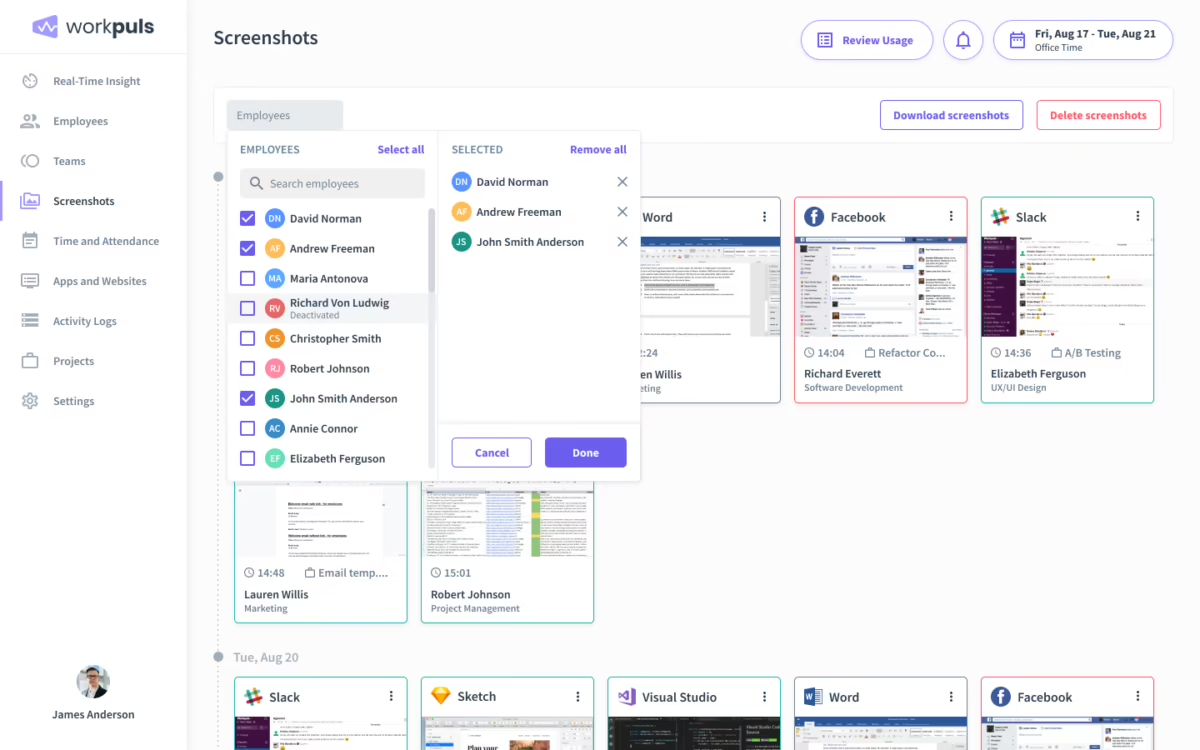
- Workpuls helps business leaders and managers get clear visibility into how work is distributed across different projects, teams, and digital tools.
- The tool offers comprehensive project management features to enable managers to identify inefficiencies, rebalance workloads, and enhance operational planning.
- Built with enterprise-level security and compliance, the platform provides unmatched security in the cloud or on-premise while maintaining transparency.
- The tool combines time tracking with behavioral analytics to support informed productivity strategies and optimize time allocation.
Pricing
View more on pricingExplore Workpuls’s complete range of pricing tiers. Learn more about what each plan includes, its costs, available features, integrations, etc., to decide whether Workpuls is the right software for your HR operations.
Starting price
$4.8
<p>Each device your employee uses for work counts as one user. Additionally, users with Admin, Manager and Client access won’t be charged, unless you’re using Workpuls to track their activities as well.</p>
Pricing Model
Free Trial, SubscriptionLicense
PaidFree Trial
Yes
Integrations
View the complete list of integrationsWorkpuls offers to get a clear understanding of its compatible platforms. This will help you decide whether Workpuls can fit into your current tech stack or not.










Reviews
View All Reviews0/ 5
0% of Workpuls users would recommend it
Have you used this software?
Share your feedback to help others decide whether they should use this.
Write a reviewFeatures
| Feature | Feature Rating | Available in Category |
|---|---|---|
Absence ManagementAbsence management tracks leave, holidays, and unplanned absences, helping managers maintain workforce balance, ensure accurate payroll processing, and support employee wellbeing through transparent scheduling controls. |
|
|
Activity ManagementActivity management organizes work into structured tasks, enabling teams to record time accurately and improve focus on priority assignments for smoother project execution . |
|
|
Activity TrackingActivity tracking records how employees spend their working hours, offering insights into productivity patterns and supporting better resource planning decisions for business growth every day. |
|
|
APIAPI enables seamless integration with external tools, allowing time data to sync automatically and support customized workflows across business applications for improved system performance . |
|
|
Assignment ManagementAssignment management helps distribute tasks among team members, track responsibilities, and ensure work is completed within planned timelines for better coordination and higher team efficiency. |
|
|
Attendance ManagementAttendance management monitors employee presence, absences, and shifts, ensuring accurate records for payroll processing and workforce planning needs across multiple teams and locations every day. |
|
|
Attendance TrackingAttendance tracking captures clock-in and clock-out times, helping organizations measure working hours and improve compliance with labor policies for consistent workforce management. |
|
|
Automatic Time CaptureAutomatic time capture records work hours without manual input, ensuring accuracy and reducing dependency on employee memory for reliable data and faster payroll processing . |
|
|
Billable & Non-Billable HoursBillable and non-billable hours tracking separates chargeable work from internal tasks, helping businesses manage profitability and resource allocation effectively for clear financial visibility. |
|
|
Clock In/ OutClock-in/out features record working hours accurately, helping organizations track attendance, reduce errors, and support fair payroll processing with simple time entries. |
|
|
Communication ManagementCommunication management centralizes messages, alerts, and updates in one place, helping teams stay informed, engaged, and aligned with schedules and organizational objectives at all times. |
|
|
Compliance ManagementCompliance management ensures time records follow labor laws and company policies, reducing risks, improving audits, and maintaining trust through accurate documentation and reporting processes . |
|
|
Customizable BrandingCustomizable branding allows companies to personalize the interface with logos, colors, and themes, creating a consistent identity across time tracking tools and employee experiences . |
|
|
Data ImportData import allows existing records to be uploaded easily, reducing manual entry, saving time, and ensuring continuity of historical information within the system securely. |
|
|
Data Import/ExportData import/export supports smooth transfer of time records between systems, enabling backup, sharing, and integration with payroll and accounting platforms for seamless operations. |
|
|
Employee DatabaseMaintain a central employee database that stores profiles, roles, and work history, helping managers access accurate information quickly and support better workforce planning decisions. |
|
|
Employee ManagementEmployee management tools simplify scheduling, approvals, and performance oversight, enabling organizations to coordinate teams efficiently while maintaining clear records of working hours and responsibilities consistently. |
|
|
Employee PortalAn employee portal gives staff secure access to timesheets, schedules, and updates, encouraging transparency and making interactions with management faster and more convenient. |
|
|
Employee Time TrackingEmployee time tracking records working hours accurately, helping organizations calculate payroll, monitor productivity, and ensure compliance with attendance policies and labor rules across all teams. |
|
|
Manual Time TrackingManual time tracking allows users to enter hours directly, providing flexibility for roles that cannot rely on automated capture methods and simple reporting every day. |
|
|
Mobile Time TrackingMobile time tracking lets employees record hours on the go, improving accuracy and supporting real-time visibility for managers across all work locations and shifts. |
|
|
MonitoringMonitoring tools provide supervisors with live insights into attendance and activity levels, helping address issues quickly and maintain productivity across the entire workforce operations. |
|
|
Multiple ProjectsMultiple projects management lets teams track time across several assignments, helping organizations balance workloads and measure project performance clearly for improved planning and delivery success. |
|
|
Offline Time TrackingOffline time tracking lets employees record work hours without internet access and sync data automatically later, ensuring accurate records even in remote or connectivity locations. |
|
|
Overtime CalculationOvertime calculation automatically applies company rules to extra working hours, helping payroll teams compute wages correctly while maintaining transparency and compliance with labor regulations nationwide. |
|
|
Overtime TrackingOvertime tracking records additional work hours in real time, giving managers visibility into workload patterns and helping prevent burnout and unexpected payroll costs for teams. |
|
|
Payroll IntegrationPayroll integration connects time data directly with salary processing systems, reducing manual entry, minimizing errors, and ensuring employees are paid accurately and on time monthly. |
|
|
Performance ReportsPerformance reports combine time and productivity data to highlight trends, measure efficiency, and support informed decisions for employee development and project improvement across all teams. |
|
|
Progress TrackingProgress tracking shows how tasks and projects advance over time, helping teams stay focused, meet deadlines, and improve accountability across departments for work goals. |
|
|
Project ManagementProject management tools organize tasks, teams, and schedules in one place, helping organizations deliver work efficiently while maintaining clear timelines and responsibilities for every project. |
|
|
Project PlanningProject planning features help define goals, allocate resources, and set timelines, enabling teams to prepare structured workflows and avoid delays for smoother execution each day. |
|
|
Project Time TrackingProject time tracking records hours spent on each task, helping organizations understand effort distribution and improve cost control for every assignment across all active projects. |
|
|
Project TrackingProject tracking provides continuous visibility into task status and milestones, enabling managers to address risks early and keep work on schedule for reliable project delivery. |
|
|
Real Time AnalyticsReal-time analytics delivers instant insights into attendance and productivity, allowing managers to make faster decisions based on live operational data for better workforce planning. |
|
|
Real Time DataReal-time data updates working hours and activity information continuously, ensuring organizations view the latest status of teams and projects for improved control. |
|
|
Real Time MonitoringReal-time monitoring allows supervisors to watch attendance and task progress live, supporting immediate action and better operational control for busy teams and management. |
|
|
Real Time NotificationsReal-time notifications alert users about approvals, delays, and updates instantly, helping teams respond quickly and avoid missed tasks during important work and project cycles. |
|
|
Real Time ReportingReal-time reporting generates live reports on time and performance metrics, enabling managers to evaluate progress without waiting for manual updates for faster business decisions. |
|
|
Real Time UpdatesReal-time updates refresh schedules and records instantly, ensuring every user works with current information and avoids confusion or delays across all business operations. |
|
|
Reporting StatisticsLorem Ipsum is simply dummy text of the printing and typesetting industry. |
|
|
Secure Data StorageSecure data storage protects time records and employee records with strong security controls, ensuring information remains confidential and safe from unauthorized access. |
|
|
SSL SecuritySSL security encrypts sensitive data, protecting it from cyber threats and ensuring secure communication between users's browsers and the system. |
|
|
Status TrackingReal-time status tracking shows progress of tasks and approvals as they happen, helping teams stay updated and complete work efficiently without confusion or unnecessary delays. |
|
|
Summary ReportsWith summary reports, time-tracking software users can aggregate key time and productivity metrics in simple formats for quick reviews and informed business decision-making. |
|
|
Task ManagementThe task management functionality centralizes assignment, priority, and deadline management, enabling teams to plan work, track progress, and maintain accountability throughout each project. |
|
|
Task PlanningTask planning helps teams define goals, timelines, and responsibilities in advance, creating structured workflows that reduce confusion and improve productivity across departments. |
|
|
Task SchedulingTask scheduling assigns work to employees based on timelines and availability, ensuring balanced workloads and smoother coordination across teams and projects, improving daily efficiency. |
|
|
Task TrackingTask tracking shows real-time progress and completion status, helping managers identify delays and keep projects on schedule with clear operational performance insights. |
|
|
Time & Expense TrackingTime & expense tracking records work hours and costs, helping organizations set and control budgets and easily understand project profitability for smarter financial planning. |
|
|
Time ClockThe Time Clock feature allows employee to record their start, break, and end times digitally, replacing the biometric system and ensuring accurate attendance records. |
|
|
TimerA built-in Timer allows users to start, pause, and stop tracking task progress, providing precise data for billing and payroll, as well as productivity analysis. |
|
|
Timesheet ManagementTimesheet management simplifies the recording and reviewing of employee work hours, tasks, and project time, helping HR teams process payroll faster and with fewer errors. |
|
|
TimesheetsTimesheets record employee working hours in clear formats, providing reliable data for payroll processing, internal audits, and productivity reviews across teams and business units. |
|
|
Vacation/Leave TrackingVacation and leave tracking monitors employee time-off, such as PTO, sick leave, and vacation days, ensuring proper staffing levels and accurate payroll processing. |
|
|
Workflow ManagementWorkflow management automates task assignment and approvals, helping teams work efficiently while maintaining consistency and accountability across departments and daily business operations. |
|
Compare
Vs.
Choose comparison




Alternatives
View all alternativesDiscover Workpuls's most popular alternatives. Run a detailed comparison of how Workpuls performs against other leading software in the same category, in terms of pricing, features, benefits, and more.




PushFar
PushFar is the world's leading mentoring software solution, used by hundreds of organisations globally.
View Workpuls in other categories
Workpuls is also a part of other HR software categories, where you can find category-specific features, user reviews, pricing details, and more.


